
CSV and PDF Entry-List Import
Fills a participant preset from an existing entry list instead of typing it by hand.
CSV is a local, instant parse: RaceTagger reads your column headers and maps them
to race number, name, team, category and more. PDF sends the document to an AI
edge function (parsePdfEntryList) that reads it visually — including scanned,
image-only PDFs a text extractor can't decode — and returns each participant with a
structured list of drivers. Both paths can either create a brand-new preset or merge
into the preset you already have open, updating existing race numbers and adding new
ones.
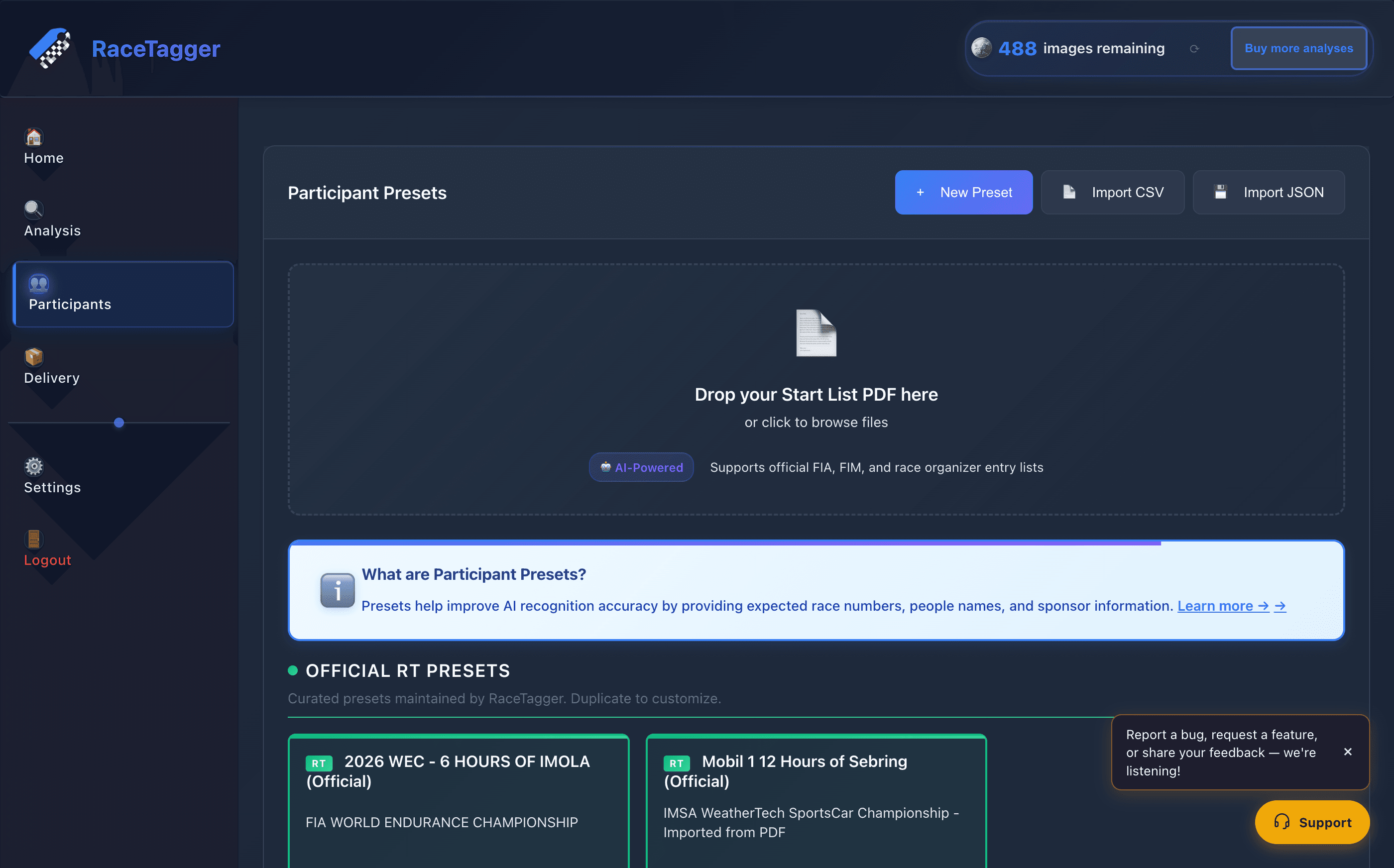
How to use it
- 1Open Participants in the sidebar, then click Manage Presets on the Analysis page:
- 2Click Import CSV (page-level button) to create a new preset from a CSV, or drop a PDF onto the Drop your entry-list…: PDF here zone.
- 3To update an already-open preset instead of creating a new one, use its Update participants action — the same "Import…: from PDF" modal opens with a drop zone ready for a new file.
- 4For CSV: pick the file in the Import Participants from CSV modal. The Preview (first 5 rows) table shows how the columns were read before you confirm.
- 5For PDF: after upload, the modal shows a Preview state — Preset name, a per-driver chip for every participant (first 10 rows), and — in merge mode — a merge impact summary plus "What to do with the ones not in this PDF" (Deactivate / Remove from preset / Keep unchanged).
- 6Confirm: Import (CSV, create-new) or Add N · update M (PDF/CSV, merge into the open preset). Nothing is deleted until you then click Save Preset.
- 7To go the other way, use Export as CSV on a saved preset's menu to download its roster (English column names…: , comma-delimited).
CSV format
- Delimiter is comma only — semicolons and tabs are not read. Excel's Italian/
German/other European locales export semicolon-separated CSVs by default; save as
CSV UTF-8 (Comma delimited)instead, or use Google Sheets' comma export. - Headers are case-insensitive; a space is treated the same as an underscore
(
Bib Number=bib_number). - Accepted headers (any one of each group), mapped in
renderer/js/participants-manager.js(parseCSV) and mirrored insrc/database-service.tsfor the create-new path:- Race number (required) —
Number,number,numero,race_number,bib,Bib - Name —
Driver,driver,Person,person,Name,name,nome - Team —
Team,team,squadra - Category —
Category,category,class,Class,categoria - Plate —
Plate_Number,plate_number,Plate,plate - Other columns read as-is:
Car_Model,Nationality,Sponsors/sponsor,Metatag,Folder_1/Folder_2/Folder_3(+_Pathvariants) - Any unrecognised column is kept as a custom field, not discarded.
- If not one row produces a race number after mapping, the import fails immediately with the list of headers it found, instead of silently creating a preset that can never match a photo.
- Race number (required) —
_Driver_Names(pipe-delimited, e.g.Kaya, Mustafa Mehmet|John Doe) is the unambiguous way to give a driver a name that itself contains a comma. When present it is preferred over splitting the plainDriver/nomecell. When absent, the legacy rule still applies: a comma insideDriver/nomemeans two drivers ("Max Mustermann, John Doe"→ two people)._Driver_IDs,_Driver_Metatagsand_Driver_Nationalitiesare the matching hidden pipe-delimited columns for round-tripping per-driver metadata.- Export as CSV always writes all of the above columns, including the hidden
_Driver_*ones, so an export → re-import round-trip is lossless — comma-names included.
PDF import
- Drop or browse a
.pdffile, 20 MB maximum (checked client-side before upload; larger files are rejected with a notification and never sent). - The renderer base64-encodes the file and calls the
supabase-parse-pdf-entry-listIPC handler, which invokes theparsePdfEntryListSupabase Edge Function — the PDF is read visually rather than text-extracted, so column-heavy layouts (numbers detaching from names) and scanned/image-only lists both work. Supports official FIA, FIM and race-organizer entry lists per the modal's own copy. - If the document isn't recognised as an entry/start list, the modal shows a Document Not Recognized state with the detected type and confidence instead of a generic error.
- The Edge Function returns a structured
drivers[]array per participant — each element is one whole driver — so aLastname, Firstnamename (common in German lists) is never mis-split the way a plain comma-joined name would be. The preview table and the actual import both consume this structured array first, falling back to splitting the joined name only when the array is absent.
Limits and known behaviour
- CSV preview shows only the first 5 rows and PDF preview only the first 10 participants — display only; the full file is parsed and imported on confirm.
- CSV delimiter is comma-only; a semicolon-delimited export from a European-locale Excel silently fails to find any recognised header.
- A plain
Driver/nomeCSV cell always splits on comma into multiple drivers — a single driver whose name contains a comma needs the_Driver_Namescolumn or a PDF import to stay one person. - PDF import size cap is 20 MB per file; page/row counts on the AI side are not enforced or capped in this codebase (the edge function itself lives outside this repo).
- Merge mode (
Update participants/ merging CSV into an open preset) never deletes anything until "Save Preset" is clicked; "Deactivate" is the default action for participants missing from the new file, keeping their existing photos and data.