
What Makes Cycling Photography So Difficult to Tag
Before comparing tools, it's worth understanding why cycling photography is arguably the hardest discipline for automated race number detection. The challenges go well beyond what motorsport or running photographers face.
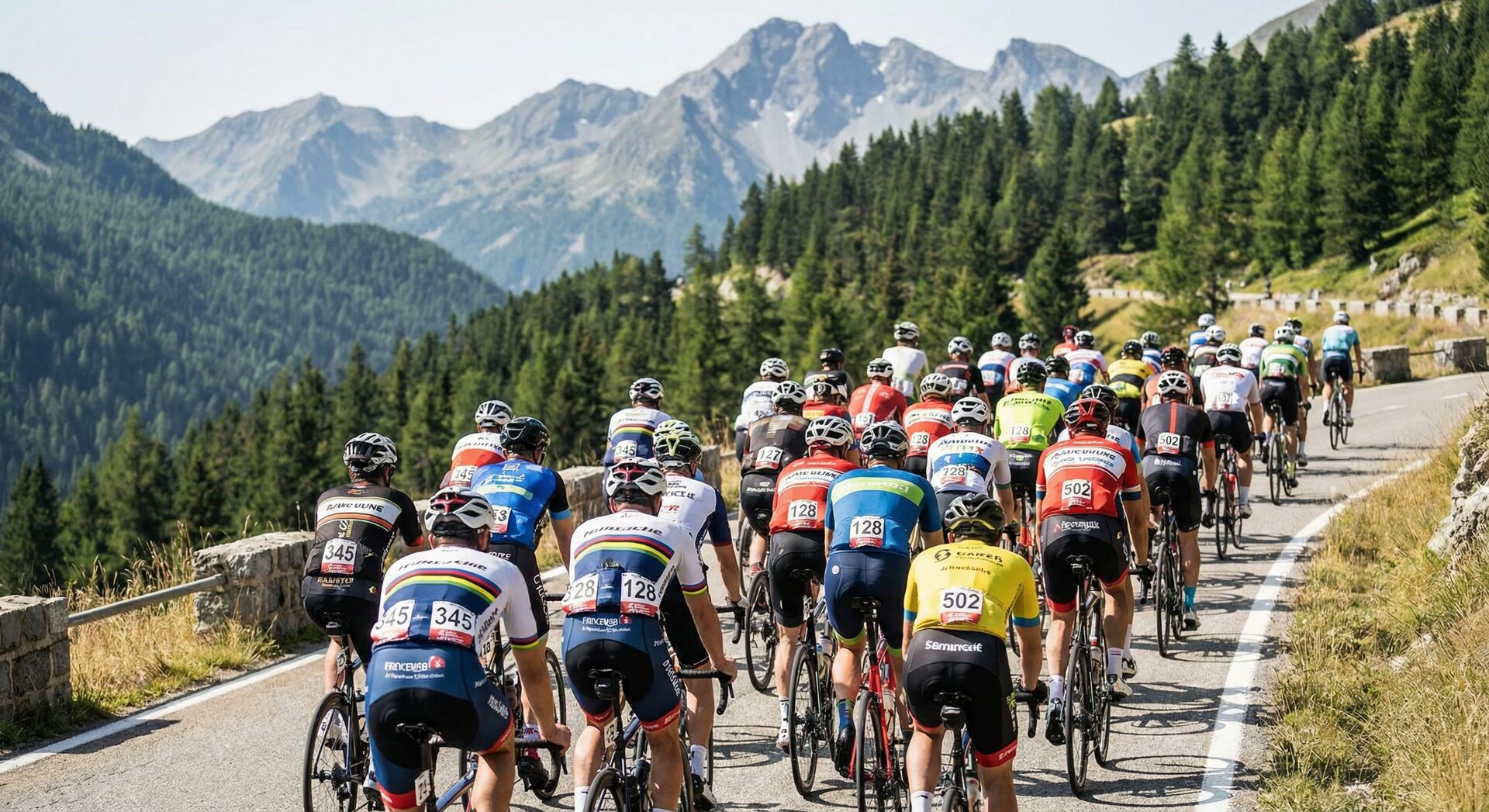
In motorsport, car numbers are large, rigid, and always in the same position on the vehicle. In running events, bib numbers are pinned to the front of the torso and generally face the camera at finish-line shots. Cycling breaks both of these assumptions. A rider's bib number might be pinned to the front of their jersey, the back, or the side — and in a single photo it could be visible from any angle depending on how the rider is positioned on the bike. When a cyclist is in the drops or in an aero tuck, their number can be compressed, folded, or partially hidden by their arms.
Then there's the peloton problem. A road race or the first kilometers of a gran fondo can put 50, 100, or even 150+ riders in a single frame. Their bodies overlap, one rider's arm covers another's number, and the depth of field makes rear-group bibs blurry. Any AI tool that works well on isolated runner portraits may completely fall apart when it has to parse a dense pack of cyclists.
Weather adds another layer. Road cycling happens in rain, mountain stages bring fog and harsh directional light, and cyclocross or MTB events introduce mud that can physically cover the number. Unlike a car number plate that stays clean behind a windshield, a paper bib pinned to a jersey absorbs water, gets crumpled by a rain jacket, and collects road spray.
Finally, there's scale. A local criterium might have 80 riders, but a major gran fondo can have 5,000 to 10,000 participants, generating tens of thousands of photos across a single event. At that volume, manual tagging isn't just slow — it's economically unfeasible. You need automation that actually works.
The Tools: What's Available in 2026
RaceTagger
RaceTagger was built specifically for race photography across disciplines, and cycling is one of its core use cases. It runs as a desktop application on macOS and Windows, which means your photos never leave your machine — an important detail if you're handling event contracts with data privacy clauses.
The key differentiator for cycling is multi-rider detection: the AI can identify and read multiple bib numbers within a single frame, which is essential for peloton and group shots. You import your participant list as a CSV before processing, and the tool matches detected numbers against that list, embedding the rider's name and category directly into the photo's IPTC and XMP metadata. This means that when you import the tagged photos into Lightroom, Capture One, or Photo Mechanic, the metadata is already there — no re-typing, no cross-referencing spreadsheets.
For gran fondo photographers, the batch processing is particularly relevant. You point RaceTagger at a folder of thousands of images, and it processes them in the background while you edit or sleep. The tool flags low-confidence detections for manual review rather than guessing, which means you spend your review time on the 5-10% of ambiguous cases instead of checking everything.
Pricing is token-based: you get 500 free credits on signup, and additional tokens start at €39 for larger packs. There are no monthly subscriptions — you buy tokens when you need them, which suits the seasonal nature of cycling photography where you might shoot every weekend in summer and nothing in winter.
Photo Mechanic Plus
Photo Mechanic is the industry standard for sports photography culling, and for good reason — nothing else browses RAW files as fast. Many cycling photographers already own it and have built their entire workflow around it. Photo Mechanic Plus adds a "code replacement" feature that lets you type a bib number and have it automatically expand into a full name and category from a lookup table, which is genuinely useful for semi-manual tagging.
The catch is that there's no AI detection whatsoever. You still need to look at each photo, read the bib number yourself, and type it in. Code replacement saves you from typing "Giovanni Rossi, Elite Category, Team Bianchi" for every photo, but it doesn't save you from the hours of visually scanning thousands of images to find the numbers in the first place. For a 80-rider criterium with 500 photos, this workflow is manageable. For a gran fondo with 5,000+ photos, it becomes the bottleneck.
At $149 for a perpetual license, Photo Mechanic is excellent value — but think of it as a complement to AI tagging rather than an alternative. Many photographers use RaceTagger for the detection and matching, then import the tagged files into Photo Mechanic for culling and delivery.
Excire Foto 2025
Excire takes a different approach: it's a general-purpose AI photo organization tool that tags images by content ("bicycle", "road", "mountain", "group of people") rather than by race number. It integrates with Lightroom as a plugin and can be useful for broad categorization — separating your landscape shots from your action shots, for instance, or finding all photos that contain a bicycle.
For cycling event photography specifically, Excire has a fundamental limitation: it cannot read bib numbers. It will tell you that a photo contains cyclists, but it won't tell you which cyclists. This makes it useful as a supplementary organization tool but not as a replacement for race-specific tagging. If you shoot a mix of cycling events and non-race work (portraits, landscapes, commercial), Excire can help organize your broader archive. For the event tagging workflow itself, you'll need something purpose-built.
Priced at €99 as a one-time purchase, it's affordable and well-made for what it does — just don't expect it to solve the bib number problem.
Adobe Lightroom (AI Features)
Lightroom's built-in AI has improved significantly over the past two years. It can recognize people, tag content by category, and even suggest keywords based on image content. For general photography organization, these features are genuinely helpful and keep getting better.
For cycling event photography, though, Lightroom's AI has the same limitation as Excire: it identifies what's in the photo (a cyclist, a road, a mountain) but not who. It cannot read race numbers, and it has no concept of participant lists or event databases. There's also no way to batch-embed custom IPTC fields based on detected content. Lightroom's AI is designed for personal photo libraries, not for professional event workflows where you need to match 5,000 photos to 3,000 participants.
At $9.99/month for the Photography Plan, most cycling photographers already have Lightroom for editing. Use its AI features for what they're good at — content-based organization of your non-event work — and pair it with a dedicated tool for the race tagging workflow.
Narrative Select + Cloud AI Services
Narrative Select is an AI-powered culling tool that helps you pick your best shots faster. It's genuinely good at what it does, and some cycling photographers use it as the first step in their workflow: cull with Narrative, then tag with something else. Pairing it with cloud-based AI services like Pixelz or similar metadata tools creates a hybrid pipeline.
The main drawbacks of this approach are cost and complexity. Cloud processing means uploading and downloading thousands of high-resolution images, which is time-consuming even on fast connections and creates data privacy concerns. Subscription costs for multiple services add up quickly — Narrative Select at $15/month plus per-image costs for cloud processing can exceed $1,000 for a single large event. And stitching together multiple tools means more points of failure and a more fragile workflow.
This approach can work for photographers who are already invested in cloud-based workflows, but for most cycling event specialists, a single integrated desktop tool is simpler and more cost-effective.
Feature Comparison
The table below focuses specifically on what matters for cycling event photography — not general features, but the capabilities that determine whether a tool can handle the unique demands of the discipline.
| Feature | RaceTagger | Photo Mechanic | Excire | Lightroom | Narrative+Cloud |
|---|---|---|---|---|---|
| Bib number detection | AI-automated | Manual (code replacement) | No | No | Depends on service |
| Multi-rider per frame | Yes (20+ riders) | N/A (manual) | No | No | Limited |
| CSV participant matching | Native import | Code replacement tables | No | No | No |
| Gran fondo scale (5,000+ riders) | Yes | Possible but very slow | No | No | Possible |
| IPTC/XMP metadata embedding | Full (name, category, team) | Full | Keywords only | Basic | Varies |
| Desktop processing (no upload) | Yes | Yes | Yes | Hybrid | No (cloud) |
| Batch processing speed | ~1,000 photos/hour | Manual speed | N/A | N/A | Depends on upload |
Choosing by Event Type
Road Races and Criteriums
Road racing presents the density challenge at its most extreme. A criterium downtown with barriers and tight corners is photographically intense but manageable in post — the fields are smaller (60-100 riders) and you're shooting from fixed positions. A road race with a peloton of 150+ riders spread across mountain stages is a different story: you'll have group shots where identifying individual riders matters for team media packages.
For either scenario, you need a tool that handles multiple riders per frame. If you're shooting criteriums mostly, Photo Mechanic's manual workflow might still work given the smaller file counts. For road stages and multi-day events, AI detection becomes practically necessary.
Gran Fondo and Sportive Events
This is where AI tagging delivers its most dramatic ROI. A photographer covering a gran fondo with 3,000 participants might capture 8,000-12,000 images across a full day. The event organizer wants galleries up within 24-48 hours. Participants want to find their own photos instantly. Without automated tagging, you're looking at 3-5 full days of manual work that likely costs more in your time than the event paid you.
The critical requirements here are batch processing speed (you can't wait days for results), accurate CSV matching against the registration database, and a confidence scoring system that lets you focus your review time on genuinely ambiguous detections. The ability to handle numbers that are partially obscured by hydration packs, rain jackets, or other riders is also important — gran fondo fields aren't as tidy as professional pelotons.
Mountain Bike and Cyclocross
MTB and CX introduce environmental chaos. Mud covers numbers, riders are in dynamic positions over obstacles, and the lighting in forests or under overcast skies creates low-contrast conditions where numbers are harder to read even for human eyes. Number plates on bikes (common in MTB) are more durable than paper bibs but they pick up mud and can be partially obscured by knees and frame geometry.
The honest truth is that no AI tool achieves the same accuracy in muddy MTB conditions as in clean road racing conditions. Expect to do more manual review for these events. The question is whether the AI saves you enough time on the clear detections to justify the workflow — and in most cases the answer is yes, because even if 20-30% of images need manual review, the AI handles the other 70-80% automatically.

A Realistic Workflow for Cycling Events
Rather than presenting an idealized scenario, here's what the workflow actually looks like for a typical event:
Before the event, you get the participant list from the organizer. Most organizers provide an Excel or CSV export from their registration platform. You format this with the columns your tagging tool needs (bib number, name, category at minimum) and import it. This takes 10-15 minutes, and it's worth doing carefully — a clean participant list is the foundation of accurate tagging.
During the event, your only AI-related concern is shooting in a way that gives the detection the best chance of success. This means prioritizing front and three-quarter angles where bib numbers are visible, and making sure at least some of your shots from each position include clear number visibility. You're probably already doing this instinctively — these are also the shots that sell best to participants.
After the event, you transfer your cards, do a quick cull to remove obvious rejects (out of focus, completely wrong exposure), and then feed the remaining images into your tagging tool. With RaceTagger, this means selecting your image folder, loading the participant CSV, and clicking "Analyze." Processing runs in the background — typically around 1,000 images per hour depending on your internet connection and image resolution.
During review, you check the flagged detections. The tool marks low-confidence results, and you verify or correct them. This is where your photographer's eye matters — you'll spot things the AI missed and catch errors it made. Budget 30-60 minutes of focused review per 1,000 photos.
For delivery, the tagged photos import into your normal editing workflow (Lightroom, Capture One, Photo Mechanic) with metadata already embedded. You can create smart collections by rider name, filter by category, or build galleries automatically. This is the part where the time savings become most tangible — instead of building participant galleries manually, they essentially build themselves.
What Does It Actually Cost?
Let's compare the real cost of processing a 5,000-photo gran fondo event:
| Approach | Direct Cost | Time Investment | Total (at €50/hour) |
|---|---|---|---|
| Manual tagging (Photo Mechanic) | €0 (tool already owned) | ~15-20 hours | €750-1,000 |
| RaceTagger (token-based) | ~€25-50 in tokens | ~3-4 hours (cull + review) | €175-250 total |
| Cloud AI services | €100-300+ (upload fees) | ~5-6 hours (upload, review, download) | €350-600 total |
| Lightroom AI only | €10/month | ~15 hours (no bib detection) | €760/event |
The math becomes clearer when you factor in opportunity cost. Those 15 hours you save per event are 15 hours you could spend shooting another event, editing for higher-paying clients, or simply having a weekend. For a photographer covering 10-15 cycling events per season, the cumulative savings are measured in weeks of recovered time.
The Bottom Line
There's no single "best" tool for every cycling photographer — your choice depends on your event mix, volume, and existing workflow. But here's the honest assessment:
If you shoot cycling events regularly and deal with gran fondo scale, you need AI bib number detection. General-purpose AI tools (Excire, Lightroom) are useful for non-event work but don't solve the core problem of matching photos to participants. Photo Mechanic remains essential for culling and delivery but can't automate the detection step.
RaceTagger is currently the most complete solution for cycling-specific race photography: it handles the detection, the participant matching, and the metadata embedding in a single desktop workflow. The token-based pricing aligns well with the seasonal nature of cycling photography — you pay for what you use, when you use it.
The combination that works best for most cycling photographers is RaceTagger for detection and tagging, paired with Photo Mechanic or Lightroom for culling and editing. Each tool handles what it does best, and the metadata flows cleanly between them through standard IPTC/XMP fields.
Try RaceTagger on Your Next Cycling Event
Sign up for free early access — you get 500 free credits on signup. Enough to test the full workflow on your next road race or gran fondo before committing to a token pack.
Get Early Access →Related Reading
- Complete Cycling Photo Tagging Workflow Guide — step-by-step from race day to delivered gallery
- Bib Detection in Cycling Photography — how AI handles back bibs and peloton density
- Multi-Rider Peloton Tagging — tagging every rider in packed group shots
- AI Photo Tagging for Every Racing Discipline
- How AI Race Photo Tagging Works
- Photo Mechanic + AI Tagging: The Complete Workflow
- Best Race Photo Tagging Software 2026
Last updated: February 2026. Pricing and features verified at time of writing. We recommend checking each provider's website for current information.