
The Problem Every Race Photographer Knows
Whether you're shooting Formula 1, MotoGP, a local marathon, or a cycling gran fondo, the workflow bottleneck is always the same: post-event organization.
The photos themselves are the easy part. You know your camera, you know your angles, you've done this hundreds of times. But when you get home with thousands of images, the real work begins:
- Identify the race number in each photo
- Match it to the correct driver/rider/runner
- Tag the file with metadata (IPTC keywords, filename, XMP data)
- Sort into folders or galleries by participant
- Deliver to clients, teams, or photo agencies
For a typical motorsport event with 2,000-5,000 photos, this process takes 6-10 hours of manual work. That's an entire working day spent on data entry, not photography.
How AI Tagging Works
Modern AI-powered race photo tagging works in three distinct stages. Each one solves a specific part of the problem.
Stage 1: Detection — "Where is the number?"
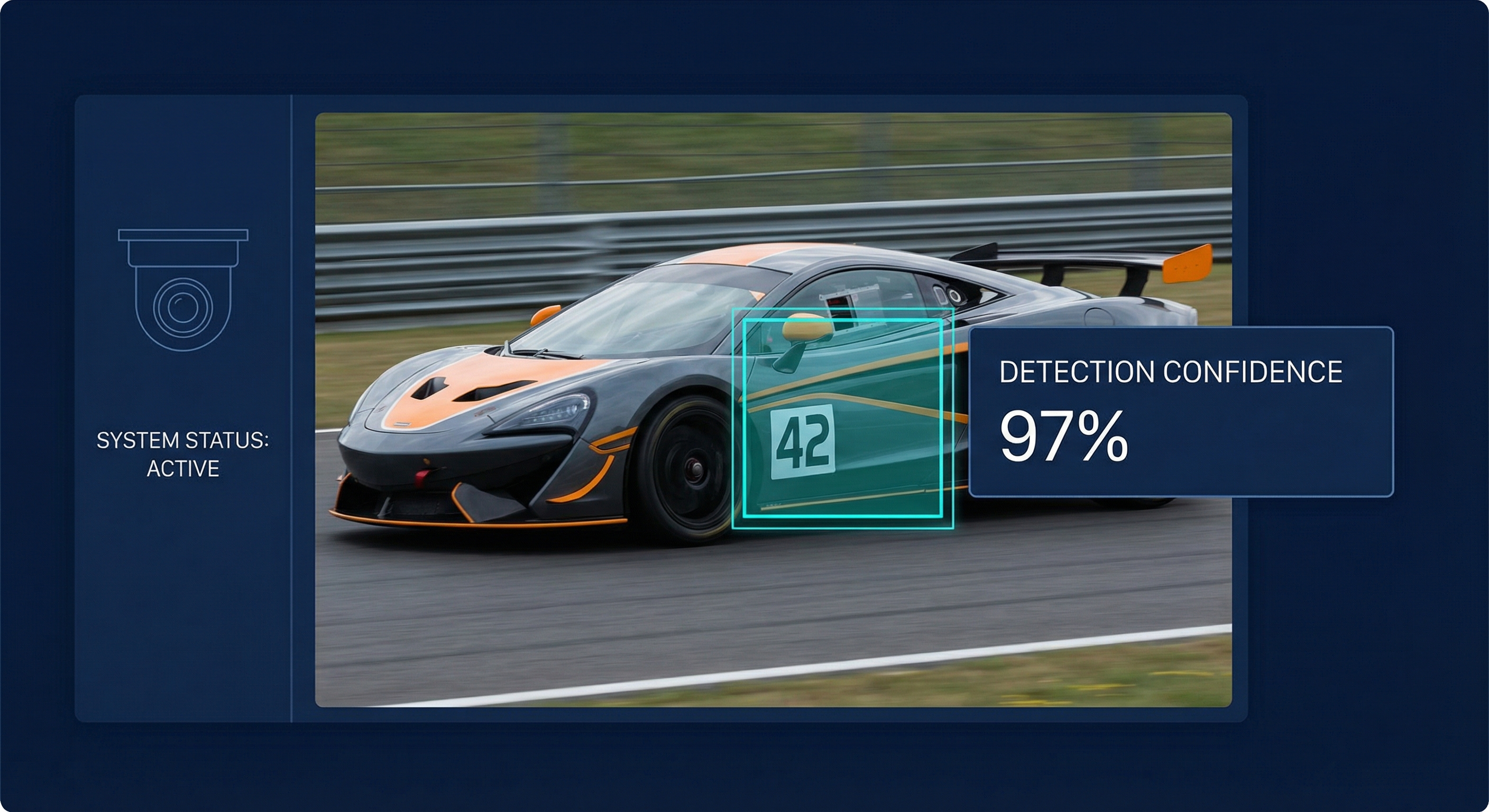
Before the AI can read a number, it needs to find it. This is the detection stage.
The AI scans every pixel of your photo looking for patterns that match what race numbers typically look like:
- Rectangular regions with high contrast against the background
- Specific positions on vehicles (doors, fairings, number plates)
- Bib-shaped areas on runners' chests
- Number plate zones on rally cars
This isn't simple template matching — it's a trained neural network that has learned from thousands of race photos what numbers look like in every condition:
- Head-on shots vs. side angles
- Bright sunlight vs. overcast
- Clean cars vs. mud-splattered rally vehicles
- Sharp focus vs. motion blur from panning
The output of this stage is a set of bounding boxes — rectangular regions where the AI thinks it found a number.
Stage 2: Recognition — "What number is it?"
Once the AI knows where to look, it needs to read the actual digits. This is where OCR (Optical Character Recognition) comes in, but it's not your standard document OCR.
Race number recognition is significantly harder than reading text on a page:
| Challenge | Document OCR | Race Number OCR |
|---|---|---|
| Angle | Always straight | 0-75° rotation |
| Motion | Static | Motion blur from 200+ km/h |
| Font | Standard fonts | Custom team fonts, stylized |
| Background | White paper | Complex liveries, sponsors |
| Occlusion | Rarely | Other cars, barriers, spray |
| Lighting | Controlled | Sun glare, shadows, night |
The AI handles all of these through specialized training. It has seen thousands of examples of each number (0-9) in every racing condition imaginable. When it encounters a new photo, it compares what it sees against everything it has learned.
The result: A detected number with a confidence score. "I'm 97% sure this is car #44" or "I'm 82% sure this bib reads 1247."
Stage 3: Matching & Tagging — "Who is it and where does it go?"
The AI has found a number and read it. Now it needs to:
- Match the number against a participant list (CSV, starting list, or preset)
- Retrieve all metadata: driver name, team, class, category
- Write this information into the photo file's metadata
- Organize the file into the correct folder or gallery
For example:
- AI detects: #44
- Matches to: Lewis Hamilton, Mercedes-AMG F1, Formula 1
- Writes IPTC keywords:
Lewis Hamilton, Mercedes, F1, Car 44 - Renames file:
HAM_44_001.jpg - Sorts to:
Gallery/Hamilton/
All of this happens in milliseconds per photo. For a batch of 3,000 images, the entire process takes about 20-30 minutes — and you don't need to touch a single file.
What Makes Race Photo AI Different
You might wonder: why not just use Google Lens or standard OCR software? The answer is specialization.
Trained on Racing, Not Documents
General OCR tools are trained on books, receipts, and street signs. They fail spectacularly on:
- White numbers on white cars (low contrast)
- Numbers partially hidden behind wheels or fairings
- Stylized fonts that teams use for branding
- Multiple numbers in one frame (car + track marshal + advertising)
Race-specific AI knows that the number on the side of a car is what matters, not the "50%" on a tire barrier advertisement.
Understanding Context
Smart race photo AI doesn't just read numbers — it understands context:
- Position on vehicle: A number on the door panel = car number. A number on the pit board = lap count.
- Size and style: Race numbers have specific proportions per series (F1 vs. MotoGP vs. marathon bibs)
- Frequency: If the AI sees #44 in 200 photos and #444 in 2, the two detections of #444 are likely misreads of #44.
Handling the Hard Cases
The best AI systems include confidence thresholds. When the system isn't sure:
- High confidence (>90%): Auto-tag and move on
- Medium confidence (70-90%): Tag but flag for review
- Low confidence (<70%): Skip and let the photographer decide
This means you spend your review time only on the genuinely difficult photos, not all 3,000.
Real-World Performance
Here's what AI race photo tagging looks like in practice across different sports:
| Sport | Photos/Event | Manual Time | AI Time | Accuracy |
|---|---|---|---|---|
| Formula 1 | 3,000-5,000 | 8-12 hours | 25-35 min | 94-97% |
| MotoGP | 2,000-4,000 | 6-10 hours | 20-30 min | 93-96% |
| Marathon | 5,000-15,000 | 12-20 hours | 40-60 min | 91-95% |
| Cycling | 2,000-8,000 | 6-14 hours | 25-45 min | 92-96% |
| Rally | 1,000-3,000 | 4-8 hours | 15-25 min | 90-94% |
Note: Accuracy varies based on shooting conditions, distance, and image quality. These numbers represent typical real-world performance, not lab conditions.
The Workflow in Practice
Here's what a complete AI-powered race photography workflow looks like:
Before the Event
- Download the starting list (CSV or manually enter participants)
- Import into your tagging tool as a preset
- Set your confidence threshold (recommended: 85% for auto-tag)
During the Event
- Shoot normally — no special requirements for the AI
- Focus on getting great photos, not worrying about organization
After the Event
- Import all photos into your AI tagging tool
- Run detection — the AI processes every image
- Review flagged photos — only the ones the AI wasn't sure about (typically 5-15%)
- Export with metadata embedded, folders organized, files renamed
Delivery
- Upload organized galleries to your client portal
- Done — what used to take a full day now takes less than an hour
Getting Started with AI Race Photo Tagging
If you're ready to reclaim hours of your life after every race event, here's what you need:
- Your existing camera and workflow — AI tagging works with any camera, any format (RAW, JPEG)
- A participant list — even a basic one dramatically improves accuracy
- RaceTagger — purpose-built for race photographers, works on desktop (macOS + Windows)
AI race photo tagging is already being used by professional motorsport photographers. You can try it on your next event and see the difference yourself.
FAQ
Does AI replace the photographer's eye?
Absolutely not. AI handles the tedious data entry — matching numbers to names, writing metadata, organizing files. You still make all the creative decisions: which shots to keep, how to edit, what to deliver.
What if the AI gets a number wrong?
Good AI systems flag uncertain detections for human review. In practice, you'll spend 5-10 minutes reviewing flagged photos instead of 6+ hours tagging everything manually.
Does it work with RAW files?
Yes. AI tagging reads the embedded JPEG preview in RAW files for detection, then writes metadata back to the original RAW file (or a sidecar XMP).
What about privacy and data security?
Desktop AI tagging tools process everything locally on your computer. Your photos never leave your machine, and no data is sent to external servers.
Can it handle multiple numbers in one photo?
Yes — advanced systems detect all visible numbers in a frame and tag the photo with multiple participants. This is common in pack shots at marathons or multi-car frames at circuit races.